Showing posts with label Windows. Show all posts

How to Remove Internet Explorer from Windows Computers and Servers

Thursday, January 19, 2023

Support for Internet Explorer 11 ended on June 15, 2022 and IE 11 will no longer be accessible after February 14, 2023.

Even so, Internet Explorer 11 is still installed as the default web browser with every version of Windows and Windows Server. To make matters worse, Windows 10 also shipped with non-Chromium Edge (now called Legacy Edge). You'll need to download and install a "modern" web browser, such as Microsoft Edge, Google Chrome, FireFox, etc. Keep in mind that you can reload Internet Explorer sites with IE mode in Microsoft Edge.

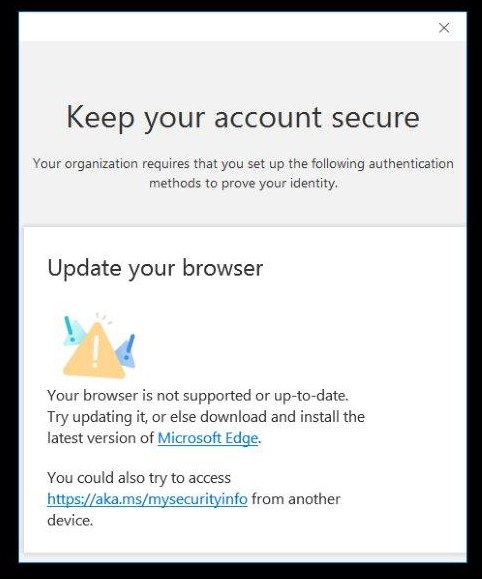
Even with ChrEdge (my name for Chromium Edge) installed as the default web browser, I've heard from a few customers that IE is still being used for some web work flows. For example, a customer recently showed me this MFA security confirmation prompt that is opening in IE for some reason.


All this leads me to the task at hand. How do you uninstall Internet Explorer 11 from Windows?

This is not straight forward since IE 11 is part of the Windows installation. It cannot be removed as a Windows application or feature. The answer is to use DISM (Deployment Imaging Servicing Management) installed with all versions of Windows and Windows Server.

Run the following command from an elevated CMD or PowerShell prompt:

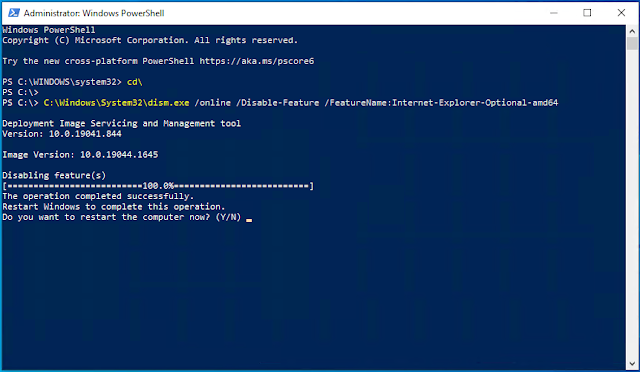
C:\Windows\System32\dism.exe /online /Disable-Feature /FeatureName:Internet-Explorer-Optional-amd64

Removal only takes a few seconds and the output looks like this:


DISM will prompt you to restart the computer to complete the operation. Until you do, Internet Explorer will still show as an available web browser. Optionally, you can add the /Quiet switch which will not show DISM uninstall progress and will automatically restart the computer when it's done.

Read more ...

Windows Server Reboot Loop After Installing January 2022 Security Updates

Sunday, January 16, 2022
It seems all my blog posts are about Microsoft update failures lately: (

I've seen several reports of Windows Server 2012 R2, 2019, and 2022 getting stuck in a reboot loop after installing the January Windows Updates. Specifically, these updates:
  • KB5009624 for Windows Server 2012 R2
  • KB5009557 for Windows Server 2019
  • KB5009555 for Windows Server 2022
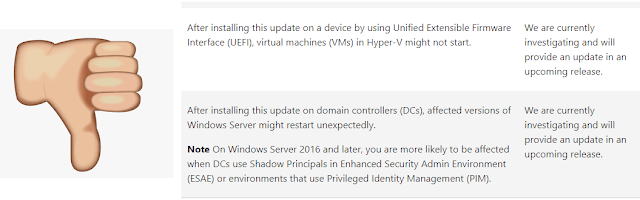
Microsoft is currently aware of the issue.


To fix the issue, restart the computer in Safe Mode which will allow you to login and remove the offending update from Windows Update. You can normally get into Safe Mode by pressing F8 immediately after the server starts.

Domain Controllers are a little more tricky, since there isn't a local user account to login with. For DCs you should restart in Safe Mode with Networking. This will allow you to login with a Domain Admin account.

To remove the update from the command line, run the the appropriate command for your operating system:

Windows Server 2012 R2:
wusa /uninstall /kb:5009624

Windows Server 2019:
wusa /uninstall /kb:5009557

Windows Server 2022:
wusa /uninstall /kb:5009555

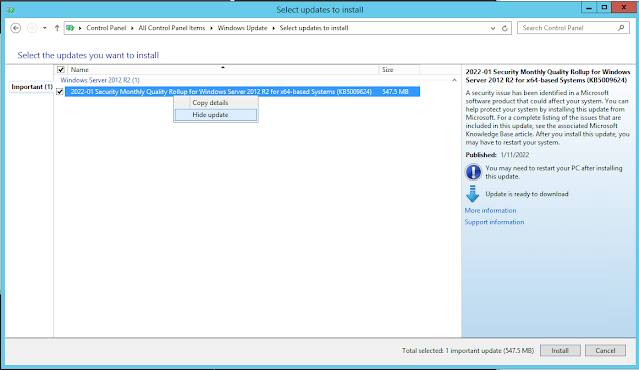
I found that if the server is configured to automatically download and install updates it will reinstall the errant update all over again. Grrrr. To prevent this, you can hide the update from reinstalling.
  • Uninstall the update and then run run Check for Updates from Windows Update in the server.
  • Right-click the update and select Hide Update to prevent it from being reinstalled.

I, for one, am really getting tired of poor quality of updates coming from Microsoft these days. There's simply no excuse for this.

UPDATE - January 17, 2022

Microsoft is releasing Out-of-band (OOB) updates today, January 17, 2022, for some versions of Windows. This update addresses issues related to VPN connectivityWindows Server Domain Controllers restartingVirtual Machines start failures, and ReFS-formatted removable media failing to mount. All updates are available on the Microsoft Update Catalog, and some are also available on Windows Update as an optional update. Check the release notes for your version of Windows for more information.

Updates for the following Windows versions are available on Windows Update as an optional update. For instructions, see the KB for your OS listed below:

·         Windows 11, version 21H1 (original release): KB5010795

·         Windows Server 2022: KB5010796

·         Windows 10, version 21H2: KB5010793

·         Windows 10, version 21H1: KB5010793

·         Windows 10, version 20H2, Windows Server, version 20H2: KB5010793

·         Windows 10, version 20H1, Windows Server, version 20H1: KB5010793

·         Windows 10, version 1909, Windows Server, version 1909: KB5010792

·         Windows 10, version 1607, Windows Server 2016: KB5010790

·         Windows 10, version 1507: KB5010789

·         Windows 7 SP1: KB5010798

·         Windows Server 2008 SP2: KB5010799

Updates for the following Windows versions are available only on Microsoft Update Catalog. For instructions, see the KB for your OS listed below:

·         Windows 8.1, Windows Server 2012 R2: KB5010794

·         Windows Server 2012: KB5010797


Read more ...

How to Self-Elevate a PowerShell Script

Friday, March 31, 2017

Update: I updated the code below so it works correctly when there are spaces in the path or script name. Thanks to Pat Richard for performance and deprecation improvements.

Most of the scripts I write require elevation -- they must be run from an elevated PowerShell prompt because they make changes to Windows that require Administrator access. The following code snippet will self-elevate a PowerShell script with this added to the beginning of the script. I honestly can't remember where I found the original code, but I updated it to work with Windows 10 and Windows Server 2016 and later build numbers.

Of course, you should ALWAYS confirm that your script is running properly before allowing it to self-elevate. I take no responsibility for the scripts that run using this code.
# Self-elevate the script if required
if (-Not ([Security.Principal.WindowsPrincipal] [Security.Principal.WindowsIdentity]::GetCurrent()).IsInRole([Security.Principal.WindowsBuiltInRole] 'Administrator')) {
if ([int](Get-CimInstance -Class Win32_OperatingSystem | Select-Object -ExpandProperty BuildNumber) -ge 6000) {
$CommandLine = "-File `"" + $MyInvocation.MyCommand.Path + "`" " + $MyInvocation.UnboundArguments
Start-Process -FilePath PowerShell.exe -Verb Runas -ArgumentList $CommandLine
Exit
}
}
Simply add this snippet at the beginning of a script that requires elevation to run properly. It works by starting a new elevated PowerShell window and then re-executes the script in this new window, if necessary. If User Account Control (UAC) is enabled, you will get a UAC prompt. If the script is already running in an elevated PowerShell session or UAC is disabled, the script will run normally. This code also allows you to right-click the script in File Explorer and select "Run with PowerShell".

Here's how it works:
  • The first line checks to see if the script is already running in an elevated environment. This would occur if PowerShell is running as Administrator or UAC is disabled. If it is, the script will continue to run normally in that process.
  • The second line checks to see if the Windows operating system build number is 6000 (Windows Vista) or greater. Earlier builds did not support Run As elevation.
  • The third line retrieves the command line used to run the original script, including any arguments.
  • Finally, the fourth line starts a new elevated PowerShell process where the script runs again. Once the script terminates, the elevated PowerShell window closes.

Pretty slick!
Read more ...

Is Your Organization Still Using SHA-1 Certificates?

Friday, February 24, 2017
Google just publicly cracked the SHA-1 algorithm, officially rendering SSL certificates using this encryption algorithm insecure from man-in-the-middle attacks.

The National Institute of Standards and Technology (NIST) mathematically predicted this would happen about this time back in January 2011. See NIST Special Publication 800-131A Revision 1: Transitions: Recommendation for Transitioning the Use of Cryptographic Algorithms and Key Lengths. Based on this recommendation, Google Chrome started warning users when they visited an SSL secured website that uses SHA-1 beginning November 2014.

Google Chrome SHA1 Notifications Gradually Ramped Up Over Time
Microsoft stated their SHA1 Deprecation Policy back in November 12, 2013, but it has since been removed. It originally said that that Windows will stop accepting SHA-1 end-entity certificates by January 1, 2017, and will stop accepting SHA-1 code signing certificates without timestamps after January 1, 2016. They updated their SHA-1 deprecation timeline to mid-2017 "to ensure compliance in all configurations and scenarios for Microsoft Edge and Internet Explorer 11."

Clearly, Google was more than happy to prove NIST's prediction right by announcing the first public SHA1 collision on February 23, 2017. Microsoft wrote a response the same day, but their timeline to remove SHA1 functionality from Windows remains mid-2017.

So who's at risk and what can be done about it?

Companies that use SSL-secured websites should check them to ensure they are not using the SHA-1 algorithm on any certificate. Root certificates are not affected by this, but best practice is to upgrade all Certificate Authorities (CA) to use the SHA256 algorithm. Nothing says bad press like a security warning or breach.

EXPTA Consulting provides PKI infrastructure services and can help install, reconfigure, or upgrade your existing PKI infrastructure securely and safely.

Users should run the latest versions of browsers. They should also be educated about browser security warnings, what they mean, and how to handle them.

Here are the current warnings users will see when visiting an SSL website using the SHA-1 algorithm from three popular browsers on Windows 10:

SHA1 Website in Chrome

SHA1 Website in Edge

SHA1 Website in Internet Explorer 11


Read more ...

Intel NUCs - Another Take on EXPTA Home Lab Servers. Builds and Parts Lists.

Friday, June 3, 2016

Own a blistering fast two-node Hyper-V lab cluster for under $1,680!

Today, I'm doing another take on my well-know home Hyper-V lab server series. My latest Gen7 builds are single-server builds with 64GB-128GB ranging from $920-$1,915 per server. That gives you super-high density in a single small, but powerful, server. In this article I'll show you how to create a two-node Hyper-V cluster using Intel NUC servers so you can learn how to use Hyper-V replication and provide true high availability and fail-over.

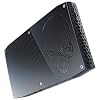
The Intel NUC (Next Unit of Computing) is a Mini PC with the power of a desktop, packing powerful productivity in a tiny 4x4 form factor. Small enough to fit in your hand, each NUC is silent and stackable. They can sit on a bookshelf, or be mounted to a wall with the VESA bracket or directly on the back of a monitor.

I've always thought these NUCs would make great Hyper-V clusters, but until just recently they were under powered and could only hold a maximum of 16GB RAM. Now there are two brand new Intel 32GB models that make this a really exciting Hyper-V lab possibility:
  • Intel NUC Kit NUC6i5SYH - Features a 6th generation dual core Intel Core i5-6260U with Intel Iris 540 graphics; Up to 32GB DDR4 RAM; Up to one M.2 and one 2.5" internal drives
  • Intel NUC Kit NUC6i7KYK - Features a 6th Generation quad core Intel Core i7-6770HQ with Intel Iris Pro 580 graphics; Up to 32GB DDR4 RAM; Up to two M.2 internal SSD drives
Both NUCs use the same storage format -- a 256GB M.2 SSD for the OS, and a 512GB SSD to run high performance VMs. With disk deduplication enabled, you can host many VMs on each node. When configured as a Hyper-V cluster, you can enable true high availability and enable new scenarios, like Hyper-V Live Migrations and Hyper-V Replication.

I also recommend using a portable 1TB USB3 external hard drive that you can share out for storing ISOs, software applications, and base images (see below). Each NUC has 2x USB 3.0 and 2x USB 2.0 ports for fast I/O performance, dual-band wireless-AC networking, 1GB NIC, Bluetooth, and built-in audio.

All you need to get started is buy the parts listed below and plug them in. They work pretty much straight of the box - no real assembly required. You'll only need to plug in the RAM and drives.

As usual, I link to Amazon for components and prices. Amazon does a very good job of maintaining stock, has an excellent return policy, and most of these items are eligible for free two-day shipping via Amazon Prime. If you don't have Prime, you can sign up for a free Amazon Prime trial here and cancel after you order the equipment if you want. Please note that it's normal for Amazon prices to fluctuate (usually down) over time.


NUC i5 Build #1 -- Intel Core i5 Dual-Core, 32GB RAM, SSD for $837 each
Component Description
 
Intel NUC Kit NUC6i5SYH (BOXNUC6I5SYH) Silver/Black
This is a 6th generation Intel Core i5-6260U dual core processor with Intel Iris graphics 540 (1.9GHz up to 2.8 GHz Turbo, 4MB Cache, 15W TDP). Supports 1x M.2 Type M SSD and 1x 2.5" SSD. 1x full-size HDMI 1.4b and 1x Mini DisplayPort 1.2 ports. 7.1 surround audio via HDMI and Mini DisplayPort. Headphone and mic jacks. 2x USB 3.0, 2x USB 2.0, and SDXC slot with UHS-I support. Dimensions: 115mm x 111mm x 48mm (roughly 4.5" by 4.5" x 1.8" - super tiny!). 19V, 65W wall-mount multi-country AC-DC power adapter (IEC types A/C/G/I). 3 year limited warranty.
 
CRUCIAL TECHNOLOGY 32GB Kit (16GBx2) DDR4 2133 MT/s (CT2K16G4SFD8213)
1.2V quad channel 2133MHz DDR 400 SODIMM memory with low CL15 latency. Great RAM at a great price. Each package contains 2x 16GB SODIMMs (32GB total). Lifetime warranty.
 
Samsung 950 PRO Series - 256GB PCIe NVMe - M.2 Internal SSD (MZ-V5P256BW)
The next-generation Samsung 950 PRO delivers uncompromising power and performance. Next Generation M.2 SSD Based on NVMe Protocol (PCIe, Gen. 3, x4). Ultra-fast Sequential Read/Write Performance: Up to 2,200MB/s and 900MB/s Respectively. Random Read/Write IOPS Performance : Up to 270K and 85K Respectively. Ultimate Performance, Reliability, & Efficient Power Management Powered by Samsung V-NAND Technology. 5 year limited warranty.
 
Samsung 850 EVO 500GB 2.5-Inch SATA III Internal SSD (MZ-75E500B/AM)
500GB SATA III 6Gb/s SSD used for active VMs (the VMs I normally have running, like a Domain Controller, Exchange servers, Skype/Lync servers, etc.). Enabling Windows Server 2012R2 disk deduplication provides even more storage capacity! Delivers up to 98K IOPS 4KB random read / 90K IOPS 4KB random write speed. Mwahaha!! 3 year limited warranty.

Obviously, you'll need two of these NUCs if you want to cluster them and you can always choose to buy one now and cluster them later.
I always update the BIOS from the Internet before installing the OS. Once you install the OS, install and/or upgrade the drivers (especially the NIC) from the manufacturers' websites. Then install the Hyper-V role and you're off to the races!
You can host quite a few VMs on this system. As an example, my Gen6 32GB server runs Windows Server 2012 R2 with the Exchange 2013 Edge Transport role and the Hyper-V host server role. This server has been running 24x7 for over a year with the following virtual machines:
  • 1x Domain Controller (2GB dynamic RAM)
  • 2x Exchange 2016 servers in a DAG (4-6GB each)
  • 1x Exchange 2013 server (4GB)
  • 1x Exchange 2010 server (4GB)
  • 1x Lync 2013 server (4GB)
  • 1x Application server (2GB)
I run these VMs off the 500GB SSD with Windows Server 2012 R2 disk deduplication enabled for Virtual Desktop Infrastructure (VDI). This allows me to put 669GB of data on this 500GB drive and I still have 145GB free space left! See Windows Server 2012 Deduplication is Amazing! for information about configuring this.


Now if you're looking for the ultimate in NUC performance check out this Intel i7 quad-core NUC:

NUC i7 Build #2 -- Intel i7 Quad-Core, 32GB RAM, 2x M.2 SSD for $1,316 each
Component Description
 
Intel NUC Kit NUC6i7KYK Mini PC (BOXNUC6I7KYK1)
This is a 6th generation Intel Core i7-6770HQ quad core processor with Intel Iris graphics 580 (2.6GHz up to 3.5 GHz Turbo, 6MB Cache, 45W TDP). Supports 2x M.2 Type M SSDs. 1x full-size HDMI 2.0 and 1x Mini DisplayPort 1.2, Thunderbolt 3 ports. 7.1 surround audio via HDMI and Mini DisplayPort. Headphone and mic jacks. 2x USB 3.0, 2x USB 2.0, and SDXC slot with UHS-I support. Dimensions: 211mm x 116mm x 28mm (roughly 8.3" by 4.5" x 1" - the size of a small paperback book!). 19V, 120W wall-mount AC-DC power adapter. 3 year limited warranty.
 
CRUCIAL TECHNOLOGY 32GB Kit (16GBx2) DDR4 2133 MT/s (CT2K16G4SFD8213)
1.2V quad channel 2133MHz DDR 400 SODIMM memory with low CL15 latency. Great RAM at a great price. Each package contains 2x 16GB SODIMMs (32GB total). Lifetime warranty.
 
Samsung 950 PRO Series - 256GB PCIe NVMe - M.2 Internal SSD (MZ-V5P256BW)
256GB for OS. The next-generation Samsung 950 PRO delivers uncompromising power and performance. Next Generation M.2 SSD Based on NVMe Protocol (PCIe, Gen. 3, x4). Ultra-fast Sequential Read/Write Performance: Up to 2,200MB/s and 900MB/s Respectively. Random Read/Write IOPS Performance : Up to 270K and 85K Respectively. Ultimate Performance, Reliability, & Efficient Power Management Powered by Samsung V-NAND Technology. 5 year limited warranty.
 
Samsung 950 PRO Series - 512GB PCIe NVMe - M.2 Internal SSD (MZ-V5P512BW)
512GB for VMs. The next-generation Samsung 950 PRO delivers uncompromising power and performance. Next Generation M.2 SSD Based on NVMe Protocol (PCIe, Gen. 3, x4). Ultra-fast Sequential Read/Write Performance: Up to 2,500MB/s and 1,500MB/s Respectively. Random Read/Write IOPS Performance : Up to 300K and 110K Respectively. Ultimate Performance, Reliability, & Efficient Power Management Powered by Samsung V-NAND Technology. 5 year limited warranty.

This NUC just SCREAMS performance! If it was available with 64GB of RAM this would be my go-to build, hands down. Maybe next year. :)

I also recommend the following to complete your NUC Hyper-V lab builds:

NUC Server Build Recommended and Optional Components
Component Description
 
*Highly Recommended*
Western Digital 1TB Black My Passport Ultra Portable External Hard Drive - USB 3.0 - (WDBGPU0010BBK-NESN)
Secure portable USB 3.0 storage with optional 256-bit AES hardware encryption. Available up to 3TB. Pre-formatted with NTFS. No power supply required. Use this to store software installs, ISOs, golden masters of your VM images, etc. 3-year limited warranty.
 
Samsung 850 Pro 1 TB 2.5-Inch SATA III Internal SSD (MZ-7KE1T0BW)
Upgrade your 500GB SATA III 6Gb/s SSD used for active VMs to the 850 Pro 1TB SSD. Delivers up to 90K IOPS 4KB random read / 100K IOPS 4KB random write speed. 10 year limited warranty.
VicTsing Gold-Plated HDMI to VGA Converter Adapter for PC, Laptop, DVD, Desktop (VS1-VC38BVT-VD)
Ultra-mini HDMI to VGA converter converts video from HDMI to any monitor or projector with a VGA port. Useful if you have an old-school KVM that doesn't support HDMI or DisplayPort.
 
Cable Matters Mini DisplayPort (Thunderbolt™ 2 Port Compatible) to HDMI/DVI/VGA Male to Female 3-in-1 Adapter in Black - Supporting 4K Resolution via HDMI
Lightweight and portable adapter for connecting a Mini DisplayPort (Mini DP or mDP)/Thunderbolt 2 port compatible computer to an HDTV, monitor, or projector with HDMI/DVI/VGA; A separate HDMI/DVI/VGA cable is required. Transmits both audio and video from computer or tablet to HD display via HDMI; Supports video resolutions up to 4K via HDMI or 1920x1200 and 1080p (Full HD) via VGA/DVI and flawless audio pass-thru for uncompressed digital 7.1, 5.1 or 2 channels.

I hope these NUC builds give you the confidence to build your own Hyper-V home cluster. I'm interested to hear your experiences in the comments section below. Happy building!
Read more ...

EXPTA Gen7 Home Lab Server Builds and Parts Lists

Monday, May 16, 2016
Build your own blistering fast 64GB Windows Hyper-V lab server starting for under $1000!

Take a look at my companion article, "Intel NUCs - Another Take on EXPTA Home Lab Servers" to build a two-node Hyper-V cluster for $1,680!

I'm very pleased to provide you my latest EXPTA Gen7 home lab server builds. Advances in hardware and virtualization technology have made it possible for IT Pros to build sophisticated systems that host more VMs than ever before. Now you can build a 64GB quad-core i5 server with lightening fast SSDs for under $1,000!! That's twice the RAM and a newer Skylake processor for the same price as my 32GB Gen6 server!

I'm providing three different server builds:
  •  Intel Core i5 quad-core, 64GB RAM, SSD, small form-factor for $920.  Super-fast lab server with name-brand quality! This makes it super-easy for IT Pros to build a blistering fast Windows Hyper-V server that can run lots of VMs.
  •  Intel Xeon-D quad-core, 128GB RAM, SSD, small form-factor for $1,750.  This new Gen7 build is geared toward those who need more VM density with outstanding performance. Super reliable server-class hardware with ECC RAM. You can chose to go with 64GB for now and upgrade to 128GB later for only $1375!!!
  •  Intel Xeon E5 eight-core, 128GB RAM, SSD, ATX form-factor for $1,915.  Double the cores and double the RAM for outstanding performance. Build your own private cloud in a box! This new build also uses true server hardware and ECC RAM for the ultimate in reliability and scalability.
Each of my three Gen7 server builds use components from the vendors' hardware compatibility lists to ensure the utmost in reliability and performance. They will all run Windows Server 2012 R2 and should be "future-proof" to run the upcoming release of Windows Server 2016.

All three Gen7 builds uses the same storage format -- a 250GB SSD for the OS, a 500GB or 1TB SSD for regularly running high performance VMs, and a 2TB high performance spinning hard drive for storing ISOs, software applications, and base images. Each server utilizes SATA III 6Gb/s drives and USB 3.0 ports for fast I/O performance.

If you need help setting this gear up, take a look at my previous Gen4 and Gen5 server build articles for assistance. Building these servers takes about an hour and it's fun!

As usual, I link to Amazon for components and prices. Amazon does a very good job of maintaining stock, has an excellent return policy, and most of these items are eligible for free two-day shipping via Amazon Prime. If you don't have Prime, you can sign up for a free Amazon Prime trial here and cancel after you order the equipment if you want. Please note that it's normal for Amazon prices to fluctuate (usually down) over time.

Gen7 Build #1 -- Intel Core i5 Quad-Core, 64GB RAM, SSD, Small Form-Factor Micro-ATX, 211W for $920
Component Description
 
Intel Boxed Core I5-6600 FC-LGA14C 3.30 Ghz 6 M Processor Cache 4 LGA 1151 BX80662I56600
This is a 6th generation Intel LGA1151 Skylake processor and includes Intel HD Graphics 530, so no discrete video card is required. Intel Turbo Boost up to 3.9 GHz and runs at only 65W! Includes Intel aluminum heatsink with thermal compound and a large silent CPU fan. 3 year limited warranty.
 
CRUCIAL TECHNOLOGY 64GB Kit (16GBx4) DDR4 2133 MT/s (CT4K16G4DFD8213)
1.2V 288-pin quad channel 2133MHz DDR4 SDRAM. Low CL15 latency. Great RAM at a great price. Each package contains 4x 16GB DIMMs (64GB). Lifetime warranty.
 
Gigabyte GA-B150M-D3H Micro ATX LGA1151 Motherboard
I chose this socket 1151 Micro ATX motherboard because it supports up to 64GB quad-channel DDR4 RAM and has 6x SATA III 6Gb/s connectors. It uses the Intel B150 Express chipset, has 1 x PCI Express x16 slot running at x16, 1 x PCI Express x16 running at 4x, HDMI/DVI/VGA outputs, 6 USB 3.0 and 6 USB 2.0 ports, and an Intel GbE LAN chip (see important note below). It also has a great UEFI BIOS. 3 year limited warranty.
 
Samsung 850 EVO 250GB 2.5-Inch SATA III Internal SSD (MZ-75E250B/AM)
256GB SATA III 6Gb/s SSD used for the Windows Server operating system. Legendary Samsung quality. Delivers up to 100,000 IOPS 4KB random read / 90,000 IOPS 4KB random write speed. 3 year warranty.
 
Samsung 850 EVO 500GB 2.5-Inch SATA III Internal SSD (MZ-75E500B/AM)
500GB SATA III 6Gb/s SSD used for active VMs (the VMs I normally have running, like a Domain Controller, Exchange servers, Skype/Lync servers, etc.). Enabling Windows Server disk deduplication provides even more storage capacity! Delivers up to 98K IOPS 4KB random read / 90K IOPS 4KB random write speed. Mwahaha!! 3 year limited warranty.
 
Western Digital Black 2TB Performance Desktop Hard Disk Drive - 7200 RPM SATA 6 Gb/s 64MB Cache 3.5 Inch - WD2003FZEX
Best selling high performance 2TB WD Caviar Black SATA III 6Gb/s drive. Used for storing ISOs, software packages, seldom used VMs, base images, etc. I usually configure this drive to sleep after 10 minutes to save even more power. 5 year warranty.
 
Lite-On 24X SATA Internal DVD+/-RW Drive Optical Drive IHAS124-14
Great quality SATA III 24x ±RW DVD burner. It's cheap, too. As much as I think I can get away from having a DVD drive, I still find I need one once in a while.1 year limited warranty.
  Xion Performance Meshed mATX USB 3.0 Tower Case XON-560_WT White
Unique hybrid mesh high performance mid-tower micro-ATX case with removable drive bay cages for easy access. Pimped out with blue LEDs, which you can choose not to use. 1x external 5.25" drive bay and 2x internal 3.5" drive bays. Includes front USB 3.0 and 2.0 and audio ports. Great build quality and cable management.
  Corsair CX Series, CX430M, 430 Watt (430W), Semi Modular Power Supply, 80+ Bronze Certified
430 watt modular PSU with super quiet 80mm cooling fan system. Up to 85% energy efficiency means less heat generation and lower energy bills. Modular, so you only use the cables you need and keep it neat.
 
We need 4x SATA cables for this build. The Gigabyte motherboard comes with two SATA cables, so we need two more. Flat (not L shaped) connectors work best for this build. FYI there's no technical difference between SATA2 and SATA3 cables.

Build #1 is pretty straight forward. Make sure you have everything you need and enough space to work. Most builds take about an hour and always seem to go smoother with a cold refreshing adult beverage nearby. Assemble the drives first, then install the PSU, motherboard, CPU and RAM to button it up. Fellow MVP Andrew Higginbotham built this rig and shared some photos of how he racked the drives. I always update the BIOS from the Internet before installing the OS. The Gigabyte BIOS allows you to do this directly from the BIOS. Nice! Once you install the OS, install and/or upgrade the drivers (especially the NIC) from the manufacturers' websites. Then install the Hyper-V role and you're off to the races!
Important Note: The Gigabyte GA-B150M-D3H motherboard uses an integrated Intel gigabit NIC. I love this motherboard, but unfortunately Intel cripples their NIC drivers so they cannot be used with Windows Server operating systems. I detailed how to overcome this in my Gen5 server build (look toward the end of the article), There's another very good article here that also covers it. You'll need to go through these steps to install and/or upgrade the Intel NIC drivers for Builds #1 or #3.
You can host quite a few VMs on this system. As an example, my Gen6 32GB version of this server runs Windows Server 2012 R2 with the Exchange 2013 Edge Transport role and the Hyper-V host server role. This server has been running 24x7 for over a year with the following virtual machines:
  • 1x Domain Controller (2GB dynamic RAM)
  • 2x Exchange 2016 servers in a DAG (4-6GB each)
  • 1x Exchange 2013 server (4GB)
  • 1x Exchange 2010 server (4GB)
  • 1x Lync 2013 server (4GB)
  • 1x Application server (2GB)
I run these VMs off the 500GB SSD with Windows Server 2012 R2 disk deduplication enabled for Virtual Desktop Infrastructure (VDI). This allows me to put 669GB of data on this 500GB drive and I still have 145GB free space left! See Windows Server 2012 Deduplication is Amazing! for information about configuring this.


Gen7 Build #2 -- Intel Xeon-D Quad-Core, 128GB RAM, SSD, Small Form-Factor Mini-ITX for $1,375
Component Description
 
SuperMicro X10SDV-4C-TLN2F-O Intel Xeon D-1520 DDR4 SATA3&USB3.0 V&2GbE Mini-ITX Motherboard & CPU Cooler
Intel Xeon D-1520 processor with System on a Chip design; Supports up to 45W TDP (quad-core). Supports up to 128GB ECC/REG Memory. 1x PCI-Express 3.0 x16 Slot; 1x M.2 Slot (M key for SSD, 2242/2280, PCI-Express 3.0 x4). 6x SATA3 Ports. Aspeed AST2400 integrated graphics. Dual-Port 10-Gigabit Ethernet Controller, 1x Realtek RTL8201N PHY (dedicated IPMI). 2x USB 3.0 Ports, 4x USB 2.0 Ports (via headers), 2x RJ45 10GBase-T Ports, 1x RJ45 Dedicated IPMI LAN Port, 1x VGA Port.
 
Crucial 64GB Kit (32GBx2) DDR4 2133 MT/s (PC4-2133) CL15 DR x4 ECC Registered DIMM 288pin Server Memory
You will need two of these kits for 128GB. Each kit contains two sticks of 32GB ECC RDIMMs (64GB total). The SuperMicro Xeon-D motherboard supports up to four DIMMs, so order one kit for 64GB or two kits for 128GB. 100% tested and comes with a lifetime warranty.
 
Samsung 850 EVO 250GB 2.5-Inch SATA III Internal SSD (MZ-75E250B/AM)
256GB SATA III 6Gb/s SSD used for the Windows Server operating system. Legendary Samsung quality. Delivers up to 100,000 IOPS 4KB random read / 90,000 IOPS 4KB random write speed. 3 year warranty.
 
Samsung 850 EVO 500GB 2.5-Inch SATA III Internal SSD (MZ-75E500B/AM)
500GB SATA III 6Gb/s SSD used for active VMs (the VMs I normally have running, like a Domain Controller, Exchange servers, Skype/Lync servers, etc.). Enabling Windows Server 2012 R2 disk deduplication provides even more storage capacity! Delivers up to 98K IOPS 4KB random read / 90K IOPS 4KB random write speed. Mwahaha!! If you're building with 128GB RAM you might consider upgrading to the 1TB Samsung drive. 3 year limited warranty.
 
Western Digital Black 2TB Performance Desktop Hard Disk Drive - 7200 RPM SATA 6 Gb/s 64MB Cache 3.5 Inch - WD2003FZEX
Best selling high performance 2TB WD Caviar Black SATA III 6Gb/s drive. Used for storing ISOs, software packages, seldom used VMs, base images, etc. I usually configure this drive to sleep after 10 minutes to save even more power. 5 year warranty.
 
Lite-On 24X SATA Internal DVD+/-RW Drive Optical Drive IHAS124-14
Great quality SATA III 24x ±RW DVD burner. It's cheap, too. As much as I think I can get away from having a DVD drive, I still find I need one once in a while.1 year limited warranty.
  Thermaltake Core V1 Mini ITX Cube Gaming Computer Case CA-1B8-00S1WN-00
Beautiful Mini-ITX cube with 2x USB 3.0, 1x Headphone, 1x Mic front ports. Internal bay holds 2x 3.5", 2x 2.5" drives. 1x 200mm fan to keep everything nice and cool. Interchangeable side panels. Extreme air/liquid cooling configuration options and dual modular drive rack design with advance ventilation. Great Thermaltake quality.
  EVGA 430 W1 80+, 430W Continuous Power, 3 Year Warranty Power Supply 100-W1-0430-KR
430 watt PSU with super quiet 120mm cooling fan system. Up to 85% energy efficiency means less heat generation and lower energy bills. If you'd rather go with a modular PSU, use the Corsair CX430M PSU used in Gen7 Build #1.

This versatile Xeon-D 1520 build is a fantastic value! It offers screaming performance and true server reliability with ECC registered RAM in a tiny 10.9" x 12.4" x 10.2" package. This build was cost prohibitive just 6 months ago. You can start with 64GB RAM now and upgrade later to 128GB if you want. FTW!

Since this motherboard doesn't use Intel NICs, you won't need to do the Intel driver workaround required on the other builds.


Gen7 Build #3 -- Intel Xeon E5 Eight-Core, 128GB RAM, SSD, ATX Form-Factor for $1,915
Component Description
 
Intel Xeon E5-2609 Octa-Core V4 1.7 GHz 20MB L3 Cache LGA 2011 85W BX80660E52609V4 Server Processor
Intel Xeon 8-core 14 nm CPU architecture; 20MB L3 Cache; Only 85W. Terrific performance and reliability. 3 year limited warranty.
Cooler Master Hyper 212 EVO - CPU Cooler with 120mm PWM Fan (RR-212E-20PK-R2)
4 Direct Contact heat pipes with the patented CDC (Continuous Direct Contact) technology - creating a perfect, sleek surface for heat conduction. Silent 120mm cooling fan.
 
Kingston Savage 128GB (8 x 16GB) DDR4-2666 ECC Registered Server Memory
8x16GB = 128GB; 2666MHz DDR4; CL15 latency; ECC registered DIMMs. Built-in heat spreaders. 100% tested and comes with a lifetime warranty.
 
ASRock X99X KILLER LGA2011-v3/ Intel X99/ DDR4/ Quad CrossFireX & Quad SLI/ SATA3&USB3.0/ M.2/ A&2GbE/ ATX Motherboard
I chose this LGA 2011-v3 ATX motherboard because it has the Intel X99 chipset and supports up to 128GB RAM. It has 10x SATA III 6Gb/s connectors and 6x USB 3.0 Ports (4 rear, 2 via header); 8x USB 2.0 Ports (4 rear, 4 via headers). It has 3x PCI-Express 3.0 x16 Slots (one runs at x8), 1x PCI-Express 2.0 x16 Slot (runs at x4), and 1x PCI-Express 2.0 x1 Slot. Dual Intel I218V Gigabit Ethernet Controllers (see important note below). It also has a great UEFI BIOS. Includes 4x SATA cables. 3 year limited warranty..
EVGA GeForce 8400 GS Passive 1024 MB DDR3 PCI Express 2.0 Graphics Card DVI/HDMI/VGA, 01G-P3-1303-KR
Unlike Core i5 CPUs, Intel Core i7 and Xeon CPUs do not feature integrated graphics. This fan-less 1GB GeForce 210 video card features DVI-I, D-Sub, and HDMI outputs. Perfect for servers.
 
Samsung 850 EVO 250GB 2.5-Inch SATA III Internal SSD (MZ-75E250B/AM)
256GB SATA III 6Gb/s SSD used for the Windows Server operating system. Legendary Samsung quality. Delivers up to 100,000 IOPS 4KB random read / 90,000 IOPS 4KB random write speed. 3 year warranty./td>
 
Samsung 850 EVO 1 TB 2.5-Inch SATA III Internal SSD (MZ-75E1T0B/AM)
1TB SATA III 6Gb/s SSD used for active VMs (the VMs I normally have running, like a Domain Controller, Exchange servers, Skype/Lync servers, etc.). Enabling Windows Server 2012 R2 disk deduplication provides even more storage capacity! Delivers up to 98K IOPS 4KB random read / 90K IOPS 4KB random write speed. Mwahaha!! 3 year limited warranty.
 
Western Digital Black 2TB Performance Desktop Hard Disk Drive - 7200 RPM SATA 6 Gb/s 64MB Cache 3.5 Inch - WD2003FZEX
Best selling high performance 2TB WD Caviar Black SATA III 6Gb/s drive. Used for storing ISOs, software packages, seldom used VMs, base images, etc. I usually configure this drive to sleep after 10 minutes to save even more power. 5 year warranty.
 
Lite-On 24X SATA Internal DVD+/-RW Drive Optical Drive IHAS124-14
Great quality SATA III 24x ±RW DVD burner. It's cheap, too. As much as I think I can get away from having a DVD drive, I still find I need one once in a while.1 year limited warranty..
  Cooler Master HAF XB II EVO ATX HTPC Case RC-902XB-KKN2
ATX mid tower case; Removable drive cages; 2x Front 120mm fans to keep everything nice and cool. 2 x USB 3.0 Ports, 1 x e-SATA, audio in/out (HD) ports, and power/reset buttons in front. Great Cooler Master quality and roomy enough to take that big Cooler Master CPU cooler.
  EVGA 430 W1 80+, 430W Continuous Power, 3 Year Warranty Power Supply 100-W1-0430-KR
430 watt PSU with super quiet 120mm cooling fan system. Up to 85% energy efficiency means less heat generation and lower energy bills. If you'd rather go with a modular PSU, use the Corsair CX430M PSU used in Gen7 Build #1.

Gen7 Build #3 delivers the ultimate in scalability and reliability. With a Xeon E5 eight-core processor and 128GB this server is a beast. It utilizes a 1TB SSD drive for active VMs. With disk deduplication enabled I sincerely believe you can place all your active VMs there with no problem. This is truly a private cloud in a box.
Important Note: The ASROCK X99X KILLER motherboard uses an integrated Intel I218V gigabit NIC. I love this motherboard, but unfortunately Intel cripples their NIC drivers so they cannot be used with Windows Server operating systems. I detailed how to overcome this in my Gen5 server build (look toward the end of the article), There's another very good article here that also covers it. You'll need to go through these steps to install and/or upgrade the Intel NIC drivers for Gen7 builds #1 or #3.


There are a number of options you can add to each of these Gen7 builds. Here are some recommendations:

Server Build Optional Components
Component Description
 
TP-LINK TG-3468 10/100/1000Mbps Gigabit PCI Express Network Adapter
This PCI-e NIC will work in any of the three builds. The best practice for Hyper-V servers is to use a dedicated NIC for server management. This inexpensive option lets you do just that. You may also decide to use this NIC instead of monkeying around with the Intel NIC drivers on builds #1 and #3.
 
Samsung 850 Pro 256GB 2.5-Inch SATA III Internal SSD (MZ-7KE256BW)
Upgrade your 256GB SATA III 6Gb/s SSD to the 850 Pro version with 3D VNAND technology. Delivers up to 100,000 IOPS 4KB random read / 90,000 IOPS 4KB random write speed. 10 year warranty.
 
Samsung 850 Pro 1 TB 2.5-Inch SATA III Internal SSD (MZ-7KE1T0BW)
Upgrade your 1TB SATA III 6Gb/s SSD used for active VMs to the 850 Pro. Delivers up to 90K IOPS 4KB random read / 100K IOPS 4KB random write speed. 10 year limited warranty.
Sabrent 74-In-1 3.5-Inch Internal Flash Media Card Reader/Writer with USB Port (CR-USNT)
Adds another USB 2.0 port to the front of the server. Supports 74 different types of memory cards. The 6 card reader slots include all formats of the following flash media types: M2, XD, SD/SDHC/SDXC/MMC, Micro SD/SDHC/SDXC (T-flash) CF/MD, MS
 
Rosewill RDCR-11003 74-In-1 USB 3.0 3.5-Inch Internal Card Reader with USB Port (RDCR-11003)
This is the same type of card reader, but includes a USB 3.0 port instead of USB 2.0 and is better quality than the Sabrent reader.
 
Cable Matters SuperSpeed USB 3.0 Type A Male to Female Extension Cable in Black - 10 Feet
I strongly recommend getting one of these for every build. Plug the male end into a USB 3.0 port on the back of the server and feed the female end up to your work space for a super-convenient USB 3.0 port where you need it.

I hope these builds give you the confidence to build your own Hyper-V home lab server. I'm interested to hear your experiences in the comments section below. Happy building!
Read more ...